Overview
The last few years have seen an ever growing adoption of Kubernetes at the enterprise layer.
Kubernetes adoption continues to grow, with 80% of organizations running it in production, up from 66% in 2023 - CNCF 2024 Survey
As such, now is a great time to understand more about running Kubernetes on AWS with Amazon EKS (Elastic Kubernetes Service). This guide provides a simple introduction to Amazon EKS - a fully upstream and certified conformant and compliant version of Kubernetes. The intention is to walk someone through standing up an Amazon EKS cluster in a custom VPC, whilst explaining all of the important features and capabilities.
There is a separate code repository available for this guide which can be found at EKS Guide Code. The code repository should be cloned locally to make it easy to run through this guide.
AWS Architecture
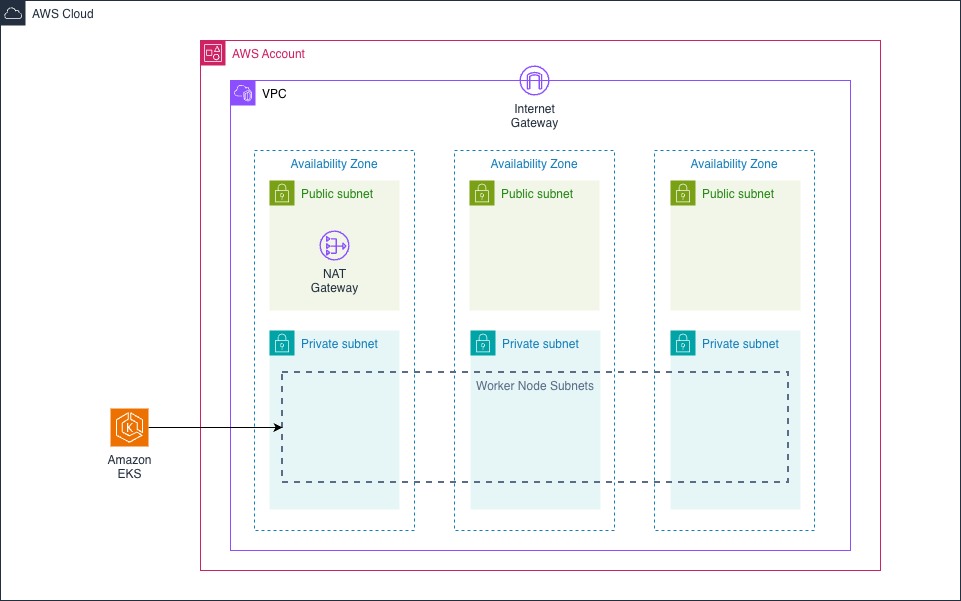
The initial Terraform scripts can be found in the terraform directory of the code repository. It sets up the following architecture in AWS:
There are 3 input variables that must be set in the terraform.tfvars configuration file:
aws_region- the AWS region code to deploy the infrastructure into e.g. eu-west-2cluster_name- the name for the Amazon EKS clustervpc_cidr- the CIDR range to use for the VPC to be created
The script creates a VPC with three public subnets and three private subnets. There is only one NAT Gateway configured to keep the cost down for a sandbox / development environment. We need at least two public subnets because the ALB Load Balancer Controller installed with EKS Auto Mode requires at least 2 public subnets to create an internet-facing ALB which we utilise in this guide.
An Amazon EKS cluster using Auto Mode is created with the private subnets provided as the location for any worker nodes.
Prerequisites
- AWS CLI configured with credentials
- Terraform installed
- kubectl installed
Deploy Infrastructure
The infrastructure can be deployed from the root of the git repository using the following commands.
cd terraform
cp terraform.tfvars.example terraform.tfvars
# Edit terraform.tfvars with your values
terraform init
terraform plan -out=tfplan
terraform apply tfplan
Configure kubectl
# Use the output from terraform apply, or replace with your values
aws eks update-kubeconfig --name <cluster-name> --region <aws-region>
This merges configuration in a local ~/.kube/config file.
Clean Up
terraform plan -destroy -out=destroy-plan
terraform apply destroy-plan